
Last Updated: July 2026 · Read Time: 18 min · Products Reviewed: 3 picks + 3 also Considered
Remote Office Guy is reader-supported. When you buy through links on this page, we may earn a commission — at no extra cost to you. Prices shown are approximate and may vary — check the retailer for current pricing. As an Amazon Associate I earn from qualifying purchases. Remote Office Guy is a participant in the Amazon Services LLC Associates Program, an affiliate advertising program designed to provide a means for sites to earn advertising fees by advertising and linking to Amazon.com. Full disclosure here.
Quick Picks: Best Standing Desk Mats
Best for Most People
Ergodriven Topo
Polyurethane terrain mat with calculated contours. Holds shape years longer than foam. 16-year warranty.
Best Budget Pick
ComfiLife
3/4″ flat foam mat with a lifetime replacement policy. The cheapest mat worth buying.
Best Active Alternative
Fezibo Balance Board
Wobble board for users who want movement over cushioning. Shorter sessions.
The Short Answer
The right standing desk mat depends less on price than on how long you stand at a stretch. Under 30 minutes at a time, a flat anti-fatigue mat is enough — the cushioning does the work and you won’t notice the difference a more expensive mat makes. Past 45 minutes, a flat surface stops being enough: your feet settle into fixed pressure points and the fatigue comes back. That’s where a terrain mat earns its price, because the varied surface keeps you shifting without thinking about it.
Three picks cover the three ways people actually stand:
- Ergodriven Topo — the best standing desk mat for most people. Polyurethane terrain surface, 16-year warranty, and it still rebounds after years of daily use.
- ComfiLife — the best budget standing desk mat. Flat foam, roughly a fifth of the price, and backed by a lifetime replacement policy that covers the one thing budget foam does wrong.
- Fezibo Balance Board — the active alternative. Not a mat in the cushioning sense; a rocker surface for people who fidget at the desk anyway.
The rest of this guide covers the material difference that decides how long a mat lasts, the flat-versus-terrain choice, what changes when the mat lives in an office rather than a kitchen, and how to size one for your desk.
Best Standing Desk Mat Comparison (2026)
|
Mat |
Material |
Best for |
Warranty |
Price |
|---|---|---|---|---|
|
Ergodriven Topo |
Polyurethane |
Most users · long sessions |
16 years |
|
|
ComfiLife |
High-density foam |
Budget · shorter sessions |
1 year |
|
|
Fezibo Balance Board |
Wood + foam top |
Active standers · movement |
1 year |
Standing Desk Mat vs Anti-Fatigue Mat: What’s the Difference?
The two terms get used interchangeably, and for most shopping purposes that’s fine. But they aren’t the same category, and the difference explains why a mat that gets glowing reviews can still disappoint at a standing desk.
Anti-fatigue mat is the umbrella term. It covers kitchen mats, gym flooring, cashier station mats, workshop mats, and standing desk mats — anything built to reduce foot pressure during extended standing. Search for the best anti-fatigue mat and most of what comes back is designed for kitchens: long and narrow, optimised for wipe-clean surfaces and standing in one spot at a counter.
Standing desk mat is the subset built for desk work. The practical differences are width, thickness, and material. Desk users shift laterally — you turn to a second monitor, step back to read something, reposition when a call runs long. Kitchen mats at 20 inches wide don’t accommodate that. Desk mats run 24–29 inches wide for the same reason.
The material difference matters more over time. A $30 kitchen anti-fatigue mat works at a standing desk on day one. What it doesn’t do is survive the duty cycle: 6–8 hours of daily standing compresses basic foam permanently within 6–12 months, and a compressed mat provides almost no relief. A mat built for desk use — polyurethane rather than basic foam — holds its shape for years.
We use “standing desk mat” throughout this guide because that’s what these picks are built for. All three are technically anti-fatigue mats. The distinction we’re drawing is that they’re anti-fatigue mats that won’t go flat inside a year of daily eight-hour use.
Foam vs Polyurethane — Why Some Standing Desk Mats Last Years
This is the part most buying guides overlook — and it’s the key to understanding why some mats last years while others flatten in months.
Basic foam (what most budget mats use) works through air pockets. Stand on it repeatedly, and those air pockets collapse. After 6–12 months of daily use, a basic foam mat is noticeably thinner and provides measurably less relief. You can test this: press your thumb into the center of a foam mat after a year of use. It takes 3–5 seconds to return to shape.
Polyurethane foam — what the Ergodriven Topo uses — is a different material. It’s denser, more elastic, and returns to shape immediately. That’s why Ergodriven can back the Topo with a 16-year warranty. The material earns it.
Basic Foam
Air Pocket Structure
Collapses with repeated compression. Noticeably degraded after 6–12 months of daily use.
Polyurethane
Elastic cell structure
Returns to shape immediately. Holds performance for years. Higher upfront cost, lower cost-per-use.
Gel + foam (GelPro)
Dual-layer construction
Gel layer can migrate over time. Designed for kitchens — typically narrow (20″) and long, not ideal for lateral movement.
Vinyl-covered foam
Foam core + vinyl surface
Durable surface but reports of peeling over time. Quality depends heavily on adhesion between layers.
In practice, the mats that work best are the ones that encourage subtle movement while holding their shape over time. That combination is why terrain mats made from durable polyurethane — like the Ergodriven Topo — tend to stand out in long-term use.
Flat Mat vs Terrain Mat: Which Standing Desk Mat Should You Choose?
This is the decision that matters most, yet it’s rarely explained clearly. There are two meaningfully different types of mat — and the right one depends on how you use your desk.
Type 1
Flat Mat
e.g. ComfiLife, Gorilla Grip, Sky Mat
Type 2
Terrain Mat
e.g. Ergodriven Topo
The honest recommendation: If you’re new to standing desks, start with a flat mat. If you’re already standing regularly and want to get more out of the time you spend on your feet, a terrain mat gives you a genuine ergonomic upgrade.
One term worth knowing if you’re comparing listings: terrain mats are sometimes sold as domed top or contoured anti-fatigue mats. It’s the same idea — a surface with deliberate height variation rather than a uniform cushion. What separates a well-designed terrain mat from a novelty one is whether the contours are proportioned to stride length, which is why the Topo ships in two sizes based on user height rather than one universal size.
Why Standing Desk Mats Actually Work
Standing desk mats reduce fatigue by cushioning the feet and encouraging small muscle movements while you stand. Instead of standing on a rigid surface, the slightly softer mat causes subtle shifts in posture that help maintain circulation and reduce pressure on the feet and lower back.
Standing on a rigid surface forces the muscles in your feet and calves to hold static positions. Over time, this compresses blood vessels in the foot’s soft tissue, reduces circulation, and leads to the familiar fatigue and lower back discomfort of a long standing session.
Anti-fatigue mats interrupt this mechanism. The cushioned surface introduces slight instability, prompting continuous small muscle adjustments that maintain circulation and redistribute pressure away from fixed points.
The research backs this up. A controlled laboratory study found that participants prone to lower back pain experienced reduced discomfort when standing on an anti-fatigue mat compared to a hard surface.1 A separate clinical study examining surgical teams — who stand for extended periods without breaks — found measurable comfort improvements when mats were used.2
This is also why terrain mats outperform flat mats for longer standing sessions: the varied surface amplifies the instability effect, driving more movement than a flat cushion can.
The Picks: Best Standing Desk Mats by Use Case
Best standing desk mat for most people · Pick #1
Ergodriven Topo — Best Standing Desk Mat for Most People
~$109 (Original) / ~$99 (Mini)
Best for: Anyone standing 45+ minutes at a time, regular sit-stand switchers, anyone buying their second mat after a budget one disappointed.
The Topo has been Wirecutter’s top pick for ten consecutive years — not because it’s trendy but because the terrain design is genuinely different from every flat mat. The hills and dips prompt you to shift position constantly without thinking about it, which is the mechanism behind actual fatigue relief. You can’t get that benefit from a flat surface.
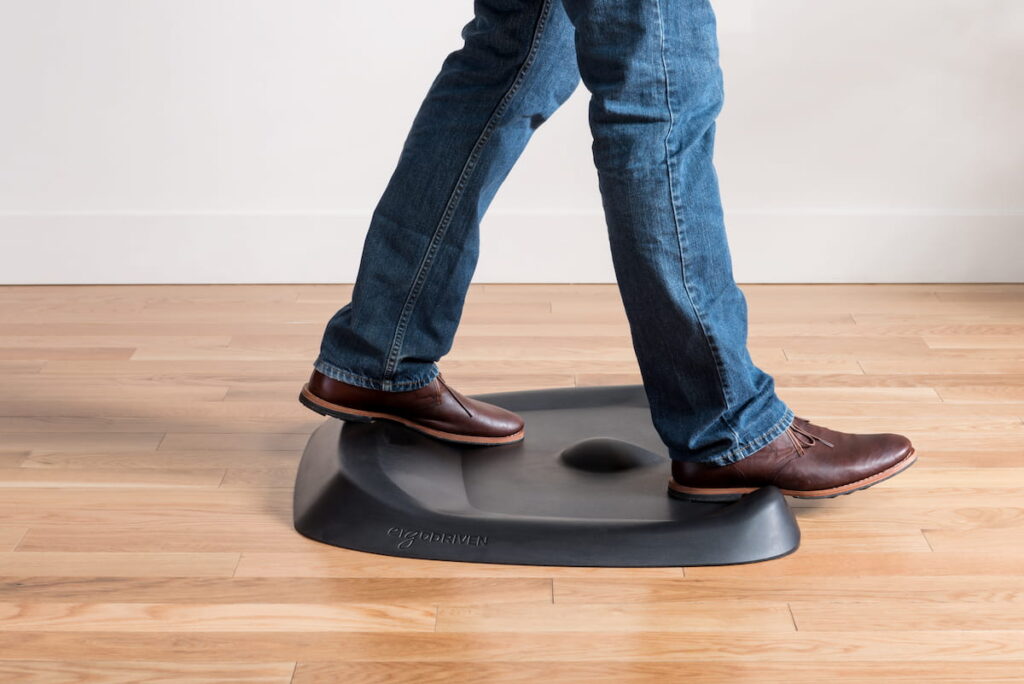
The material does what it promises. Press your hand into the neutral zone of a Topo and it bounces back immediately. That’s polyurethane working as designed — and it’s what the 16-year warranty is based on. This isn’t marketing language; it’s the physical property of the material.
One detail worth knowing: the Topo comes in two sizes based on user height. The Original (29″ × 26.25″) is for people 5’5″ and taller. The Mini (25.2″ × 19.2″) is for 5’4″ and shorter. Getting the right size matters — the terrain features are proportioned to stride length. Buying the wrong one undermines the ergonomic design.
If you’re 5’4″ or shorter, the Topo Mini is the better fit. → Check Price on Amazon
|
Material |
100% polyurethane — no PVC, no phthalates, no flame retardants |
|---|---|
|
Size (Original) |
29″ wide × 26.25″ deep |
|
Thickness |
0.85″ neutral zone / 2.7″ at highest point |
|
Height added |
~22mm (neutral zone) — check desk max height |
|
Weight |
8 lbs (Original) / 4 lbs (Mini) |
|
Warranty |
16 years |
|
Returns |
90-day satisfaction guarantee + free return |
Buy If
Skip If
Best budget standing desk mat · Pick #2
ComfiLife — Best Budget Standing Desk Mat
~$50
Best for: New standing desk users, anyone standing less than 45 minutes at a time, those who want to test the mat concept before investing in terrain.
If you’re looking for the cheapest standing desk mat that’s still worth owning, this is it. Budget mats fail in a predictable way — the foam compresses and never comes back — and most brands at this price simply let that happen. ComfiLife’s answer is a lifetime replacement policy, which is a more honest way of pricing a foam mat than pretending the foam will last.
The ComfiLife earns its budget-pick status mostly through its warranty — “lifetime money back or replacement, no questions asked” is a stronger commitment than most mats at any price. If the mat wears out or you’re simply not satisfied, ComfiLife offers a refund or replacement — a surprisingly strong policy for a mat at this price point.
What to understand about flat foam mats honestly: the ComfiLife is high-density foam, not polyurethane. It will compress more than the Topo over time. But if you’re new to standing desks and standing 20–30 minutes at a stretch, you may not notice the difference — and if the mat degrades, the warranty covers you.
Chair mat compatibility note: Flat mats like the ComfiLife are the easiest to combine with a chair mat setup. When sitting, push the ComfiLife aside. When standing, slide it into position with one foot. The thin profile makes this easy; terrain mats are harder to move quickly. The chair itself matters too — see the best chairs for a standing desk →
|
Material |
High-density foam |
|---|---|
|
Thickness |
3/4″ (19mm) |
|
Heights added |
~19mm — minimal desk height impact |
|
Sizes |
20×32″, 20×39″, 24×70″ (for kitchen use) |
|
Surface |
Stain resistant, non-slip bottom |
|
Warranty |
Lifetime money-back or replacement guarantee |
Buy If
Skip If
Best standing desk balance board · Pick #3
Fezibo Balance Board — Best Active Standing Desk Mat Alternative
~$62
Best for: Standing desk users who want active movement, those who find static standing boring, users with adjustable desks who can account for 2–3″ of added height.
The Fezibo isn’t technically a mat — it’s a balance board, which makes it a different product category. It’s included here because it addresses the same problem (standing fatigue) through a different mechanism: active engagement instead of passive cushioning.
The important standing desk-specific detail: a balance board adds 2–3″ of height. If your desk already sits at maximum height when you stand, a balance board makes the ergonomic equation worse, not better. This is why the Fezibo only belongs in a standing desk setup with a height-adjustable desk.
For the right user — someone who already uses a standing desk regularly, has desk height to spare, and finds static standing tedious — a balance board delivers more movement than any terrain mat. For everyone else, start with the Topo.
|
Type |
Wobble balance board |
|---|---|
|
Surface material |
High-density latex |
|
Sizes |
20×12″ / 25×12″ |
|
Tilt Angle |
8.5° |
|
Max Load |
320 lbs |
|
Height added |
~2–3″ — desk height adjustment required |
|
Warranty |
1 year |
Buy If
Skip If
Best Office Standing Mat: What Matters at Work
A mat that works in a kitchen doesn’t automatically work in an office. Four things change when the mat lives under a desk.
Grip on office flooring
Home offices sit on one of three surfaces: low-pile carpet, laminate or vinyl, or hardwood. Hard floors need a mat that grips — the Topo uses a silicone ring around its base that holds position without leaving marks. On low-pile carpet, weight does the work instead of grip; a heavier mat stays put where a light one creeps. If you’re on a thick carpet, be aware that a terrain mat sits less predictably: the uneven base under an uneven surface makes the contours feel inconsistent underfoot.
How often the mat moves
This is the difference most buying guides miss. A mat that lives in one position can be as thick and heavy as you like. A mat you step on and off a dozen times a day needs a low enough profile that you don’t trip on the edge, and it needs to be liftable one-handed when you sit back down.
ComfiLife’s 3/4″ profile handles that comfortably. The Topo’s 2.7″ peak means stepping onto it is a deliberate act rather than something you do absentmindedly — which is fine if you stand in blocks, and irritating if you switch every fifteen minutes.
Height, and what it does to your desk setup
A support mat raises your standing floor by anywhere from half an inch to nearly three. That changes your desk height calibration, and it’s the single most common setup mistake with standing desk mats. If you set your desk to elbow height standing on bare floor, then add a Topo, the desk is now effectively 22mm too low.
Calibrate desk height with the mat in position, not before. The standing desk ergonomics guide covers the measurement.
Cleaning
Office mats collect dust rather than food. Polyurethane wipes clean with a damp cloth. Foam mats with fabric covers need spot cleaning. Balance boards with wooden surfaces wipe fine but shouldn’t sit in moisture — mop a spill immediately rather than leaving it.
Which pick works best at a desk
For a dedicated home office where the mat stays in one place, the Topo is the better office standing mat: more relief per hour standing, and the terrain does more work the longer you’re on it. For a shared or co-working desk where the mat moves between users or gets stored between sessions, ComfiLife’s lower profile and lighter weight make it the more practical choice. A balance board works in an office, but it’s better used in focused 30–60 minute blocks than deployed all day — particularly if your day includes video calls where staying still matters.
What Size Standing Desk Floor Mat Do You Need?
Standing desk mat sizes aren’t standardised. Depths run from about 17 to 26 inches, widths from 24 to 36, and the right combination depends on how much you move while you’re standing.
Depth — front to back
- 17–20″ — enough if you stand in one position and don’t shift laterally. The Fezibo Medium at 19.9″ deep sits here.
- 21–24″ — the practical default. Allows light weight-shifting without stepping off the edge. ComfiLife at 20″ wide sits just under this band — fine for a mat you slide in and out rather than one you plant your feet on all day.
- 25–29″ — for people who reposition often, or who stand at a deeper desktop. Both the Topo Original (26.25″) and the Fezibo Large (25″) fall here — worth noting, since a balance board this size takes up as much floor as a full terrain mat.
Width — left to right
- 24–29″ — covers a normal shoulder-width stance with room to turn. The Topo Original is 29″ wide; ComfiLife at 39″ wide sits above this band, which is why it works well for pacing despite being a flat mat.
- 30–36″ — worth it if you pace at the desk or work across two adjacent positions. Fezibo, at 12″ wide regardless of size, is narrower than either — expected for a balance board, which is used with feet close together rather than shifted side to side.
Anything under 24″ wide starts to limit the lateral movement that makes a standing desk worth having. This is the specific reason kitchen mats underperform at a desk despite otherwise decent specs.
Height added to your floor
|
Mat |
Height added |
Effect on desk calibration |
|
ComfiLife |
~19mm (3/4″) |
Minor — most setups won’t need adjusting |
|
Ergodriven Topo |
~22mm at neutral zone, up to 2.7″ at peak |
Recalibrate desk height down by ~2cm |
|
Fezibo Balance Board |
~2.5″ (64mm) at peak — Large · ~1.6″ (40mm) — Medium |
Significant; check against desk max height |
If your desk is already near its maximum height, this matters. A FlexiSpot E5 tops out at 49.2″ frame-only and an E7 at 48.4″ — add a terrain mat and you lose roughly an inch of usable range at the top. Most people never hit that ceiling, but it’s worth checking before buying a thicker mat.
Our pick sizes
- Topo Original — 29″ × 26.25″. For users 5’5″ and taller.
- Topo Mini — 25.2″ × 19.2″. For users 5’4″ and under. The terrain is proportioned to stride length, so this isn’t just a smaller mat — it’s the correct one for shorter users.
- ComfiLife — 39″ × 20″ (99 × 51 cm), 0.8″ thick
- Fezibo Large — 25″ × 12″, 2.5″ peak (63.5 × 30.5 × 6.35 cm)
- Fezibo Medium — 19.9″ × 12″, 1.6″ peak (50.5 × 30.5 × 4 cm)
Which Mat Is Right For You
Other Standing Desk Mats Worth Considering
Three mats came close enough to mention. None displaced a pick, but each solves a problem the picks don’t.
Imprint CumulusPRO
A commercial-grade flat mat built for retail and industrial use. Polyurethane like the Topo, but in flat geometry — the right answer if you want the material longevity without the contoured surface. It shows up behind cashier counters and reception desks because it survives that duty cycle, which is a reasonable proxy for how it handles an eight-hour desk day. Consider it if the Topo’s terrain doesn’t appeal but ComfiLife’s foam feels like a compromise.
Vari Standing Mat
Designed to match Vari’s desk ecosystem, and priced accordingly. On specs it sits close to ComfiLife at a considerably higher price. The case for it is visual consistency if you already own Vari hardware; on its own merits, the value argument is weaker than either pick above it.
Uplift Standing Desk Mat
The same logic as Vari — built as a companion accessory for UPLIFT’s V3 and Active desks. Polyurethane construction, moderate profile, less contour than the Topo but more substance than a flat foam mat. Reasonable for UPLIFT owners who want a matched setup, though the Topo delivers more fatigue relief in the same price territory.
5 Things to Check Before You Buy a Standing Desk Mat
→ A mat solves the floor problem — the standing desk ergonomics guide covers the desk height and monitor position that makes standing sustainable.
↕
Standing desk height note
A 3/4″ (19mm) mat raises your effective standing height by 19mm. If your desk is near its maximum — FlexiSpot E5 maxes at 125cm, E7 at 125cm — add 2cm buffer when calculating your ergonomic standing position. Most users won’t hit the ceiling, but it’s worth checking before you buy a thicker terrain mat.
Frequently Asked Questions
How thick should a standing desk mat be?
The ideal thickness for a standing desk mat is about 3/4 inch (19 mm). At this thickness, a high-quality polyurethane mat provides real fatigue relief without feeling unstable. Thicker mats aren’t always better — anything above about 1 inch can start to feel soft or uneven underfoot. The material matters more than thickness: 3/4″ polyurethane outperforms 1″ basic foam in both comfort and longevity.
Do I need a mat if I only stand 20 minutes at a time?
Probably not on day one — but your standing time will increase as you get comfortable with your desk. Most standing desk owners start at 20–30 minutes and build up. A mat becomes noticeably helpful above 45 minutes of continuous standing. Buying a mat early is cheaper than buying one after your feet start hurting.
Can I use a kitchen mat as a standing desk mat?
You can, but kitchen mats are typically 20″ wide — enough for standing still, but narrow for the lateral movement that comes with a standing desk. Standing desk users shift weight and reposition frequently. A mat 24–29″ wide accommodates that better. Kitchen mats also tend to use lower-grade foam that compresses faster.
How long does a standing desk mat last?
Depends almost entirely on material. Basic foam mats compress significantly within 6–12 months of daily use. Polyurethane mats hold their shape much longer — Ergodriven backs the Topo with a 16-year warranty. The difference is visible: press your thumb into a budget foam mat after a year and it takes seconds to return to shape. A polyurethane mat returns immediately.
Does a standing desk mat work with a chair mat?
Not simultaneously — you use one or the other. The typical setup: chair mat under your desk for sitting, anti-fatigue mat positioned in front when standing. Flat mats like the ComfiLife are easiest to slide in and out quickly. Terrain mats stay put better but take more effort to move.
Does a standing desk floor mat work on hardwood floors?
Yes — all three mats reviewed here have non-slip bottoms that work on hardwood, tile, and laminate. On carpet, check that the mat specifies carpet compatibility; the ComfiLife handles both hard floors and carpet. One practical note: terrain mats like the Topo sit more stably on hard floors than on thick carpet, where the uneven base can make the terrain surface feel unpredictable underfoot.
Polyurethane or foam — which is better for a standing desk mat?
Polyurethane holds its shape after years of daily use. Press your hand into a polyurethane mat and it rebounds immediately — that’s the material working as designed. Basic foam compresses permanently over time; after 6–12 months of daily use, a foam mat may take several seconds to recover from pressure, which means it’s no longer providing real fatigue relief. For short standing sessions (under 45 minutes), a quality foam mat like the ComfiLife works fine. For longer sessions or anyone who wants the mat to last, polyurethane is the better material.
What size anti-fatigue mat do I need for a standing desk?
At minimum, 24 inches wide. Standing desk users shift weight, step back, and reposition constantly — more lateral movement than kitchen standing. A 20-inch kitchen mat is enough for standing still but narrow for a desk setup. The ComfiLife (24″) covers the minimum; the Ergodriven Topo Original (29″) gives more room for movement. Depth matters less — 20 inches is sufficient for most users.
Ergodriven Topo Original or Mini — which size should I choose?
The Topo is sized by height, not preference. The Original (29″ × 26.25″) is designed for people 5’5″ and taller. The Mini (25.2″ × 19.2″) is for people 5’4″ and shorter. The terrain features — the hills, dips, and raised elements — are proportioned to stride length, so getting the wrong size undermines the ergonomic design. If you’re exactly 5’4″, the Mini is the better fit.
What’s the difference between a standing desk mat and an anti-fatigue mat?
Anti-fatigue mat is the broader category — it includes kitchen mats, gym mats, and workshop mats alongside desk mats. A standing desk mat is the subset built for desk work: wider (24–29″ rather than the 20″ typical of kitchen mats) to allow lateral movement, and usually built from polyurethane rather than basic foam so it survives 6–8 hours of daily standing without permanently compressing. A kitchen anti-fatigue mat works at a desk short-term, but most flatten within 6–12 months of that duty cycle.
What’s the cheapest standing desk mat worth buying?
Around $50 is the practical floor. Below that, mats use low-grade foam that compresses within months, and the mat stops providing relief long before it looks worn out. The ComfiLife sits at roughly that price with a lifetime replacement policy, which is the sensible way to buy budget foam — you accept that it will compress and get a replacement when it does. Spending $30 instead of $50 usually means buying two mats inside two years.
Does a standing desk mat work on hardwood floors?
Yes. All three picks have non-slip bases suited to hardwood, tile, and laminate. The Topo uses a silicone ring that holds position without marking the floor. On carpet, check the specification — low-pile is generally fine for flat mats, but terrain mats sit less stably on thick carpet because the uneven base makes the contoured surface feel inconsistent underfoot.
Related Guides on Remote Office Guy
This article is part of the Remote Office Guy home office accessories guides — an overview of every standing desk review, comparison, and buying guide on the site.
For the full picture of how ergonomics fits into a complete home office setup, the home office ergonomics guide covers all the components together.
Related Guides